LESCO Bill Check Without Reference Number
Want to check your LESCO electricity bill but do not have your reference number? You may still be able to find the information you need by checking an old bill, locating your Customer ID, or asking LESCO to verify your billing details.
The available options depend on the bill-checking service. Many online bill lookup pages require a reference number, while some services may support a Customer ID. This guide explains where to look for your details and what to do if you cannot find either identifier.
Can You Check a LESCO Bill Without a Reference Number?
Yes, you may have other ways to locate your billing information, but it depends on which details you have and what the online service accepts. A Customer ID may work on a service that explicitly supports it. If a page only accepts a reference number, entering a name, address, meter number, or phone number in that field will not necessarily retrieve your bill.
If you have neither your reference number nor your Customer ID, check an old printed bill or contact LESCO for assistance. These are safer options than guessing an account number or using details belonging to another consumer.
Options to Try First
- Find a previous LESCO electricity bill.
- Look for the Customer ID printed on your bill, if available.
- Use a lookup page that explicitly accepts Customer ID.
- Ask LESCO to help identify the correct billing record.
1. Find Your Reference Number on an Old Bill
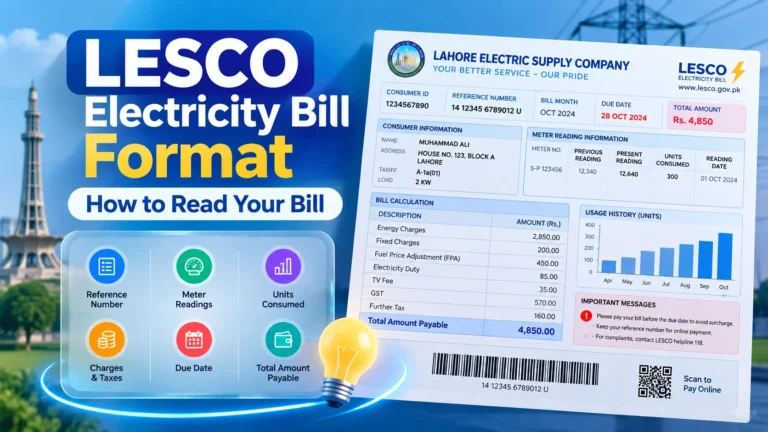
The easiest way to recover a missing reference number is to check a previous electricity bill for the same meter. If you have a paper bill at home, look for the field labelled “Reference No.” or “Reference Number.” The number is commonly printed in the consumer or billing details section.
You can also check a saved PDF, a clear photograph of an earlier bill, or a bill previously downloaded to your phone or computer. Make sure the document belongs to the correct property and meter.
- Check the most recent previous bill you have.
- Confirm the reference number digit by digit.
- Make sure it belongs to your own electricity connection.
- Keep a copy in a safe place for future bill checks.
Once you have the correct number, visit the LESCO online bill page and follow the lookup instructions displayed there.
2. Check Your LESCO Bill Using Customer ID
If you cannot find your reference number, look for a Customer ID on your previous bill. This identifier is different from the reference number. Some billing services support Customer ID lookup, but not every website offers this feature.
Steps to Try Customer ID Lookup
- Open a trusted LESCO bill-checking service.
- Check whether the page offers a separate Customer ID option.
- Locate your Customer ID on a previous bill, if it is printed there.
- Enter the number in the correct field.
- Submit the search and review the returned bill details.
3. What If You Have No Old Bill?
If you have lost every copy of your previous bill, you may need help identifying your account. Start by checking whether you have an old bill PDF, a photo in your phone gallery, or a saved copy in your email or messaging history.
If you still cannot find the details, contact LESCO through an official customer service channel and ask how to verify your connection and retrieve the correct billing identifier. The provider may require information to confirm that you are authorised to access the account.
Information That May Help
- The consumer name printed on an older bill, if known.
- The service address associated with the connection.
- Available meter or connection details.
- Any previous bill copy, payment receipt, or account record.
These details may help customer service guide you, but they are not guaranteed to work as direct online lookup credentials. Follow the verification instructions provided by LESCO.
4. Can You Check a LESCO Bill by Name or Address?
A typical online bill lookup form may not allow a consumer to search simply by name or home address. These details can be similar across different consumers, and they may not uniquely identify a particular electricity account.
If you do not have the reference number, do not assume that typing your name, address, or phone number into a reference-number field will work. Contact the provider to ask which information it accepts for account verification.
Be careful with websites claiming to find any consumer’s bill using only personal details. Use trusted services and avoid sharing private information on unfamiliar pages.
5. Check Your LESCO Bill Through Official Channels
When you cannot retrieve your bill online, official customer service is an appropriate next step. Start at the official LESCO website and look for current contact details or customer service guidance.
Explain that you need to check your electricity bill but do not have the reference number. Ask what information is required to verify your account and retrieve the correct identifier.
If your bill is due soon, make the enquiry promptly. Do not guess the bill amount or use another consumer’s details to make a payment.
Before Contacting Customer Service
- Gather any old bill or payment receipt you can find.
- Write down the billing month you need to check.
- Keep relevant connection details ready for verification.
- Use contact information published by LESCO itself.
6. Why Your LESCO Bill May Not Appear Online
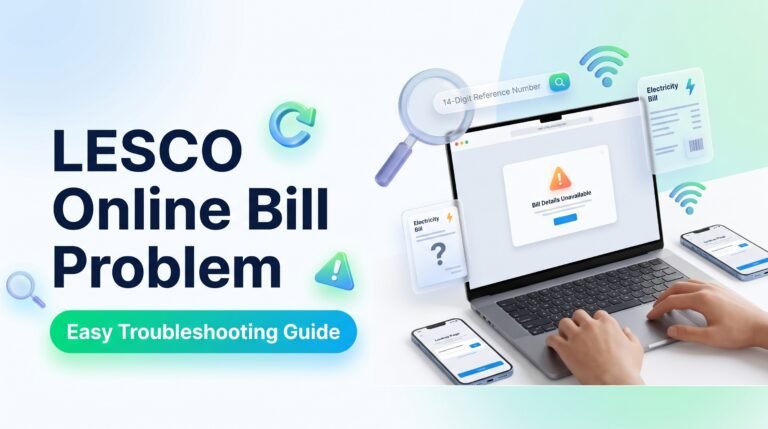
Even after locating the correct reference number or Customer ID, a bill may sometimes fail to appear. This can happen because the identifier was entered incorrectly, the latest billing data is not yet available, or the service is experiencing a temporary technical issue.
Common Reasons
- Incorrect details: A digit may be missing or entered incorrectly.
- Wrong lookup option: The page may require a reference number rather than Customer ID.
- Billing update delay: The newest bill may not yet be available through the service.
- Temporary technical issue: The website or connection may be experiencing a problem.
- Different connection: The identifier may belong to another meter or property.
Verify the details, try again later if appropriate, and use official LESCO channels if the issue persists. A “No Record Found” message by itself does not prove that your electricity connection has been cancelled.
7. How to Avoid Losing Your Reference Number Again
After recovering your billing details, keep a secure copy so that you can check future bills more easily. You do not need to search for the number from scratch every month if you maintain a record for the correct connection.
- Save a copy of your latest bill as a PDF.
- Keep a clear photograph of the bill in a secure folder.
- Record the reference number accurately for your own use.
- Label records if your home or business has multiple meters.
- Protect account information and avoid posting bills publicly.
If you manage several properties, clearly distinguish each connection’s records. This can help prevent confusion when checking monthly bills or confirming payment details.
Frequently Asked Questions
Can I check my LESCO bill without a reference number?
You may be able to use a Customer ID if the chosen service supports it. Otherwise, find the reference number on a previous bill or contact LESCO to verify your billing details.
Can I check a LESCO bill using my Customer ID?
Yes, where the bill-checking service specifically supports Customer ID lookup. Enter it in the designated field rather than the reference-number field.
Where can I find my LESCO reference number?
Check a previous electricity bill and look for the field labelled Reference No. or Reference Number. Make sure the bill belongs to the correct connection.
Can I find my bill using only my name?
Most standard lookup forms require a specific billing identifier. Your name alone may not uniquely identify your connection. Ask LESCO which verification details it accepts.
Can I check my LESCO bill using my meter number?
That depends on the official service and its available search options. Do not assume that a meter number can replace a reference number in a standard online lookup form.
What if I have lost my old electricity bill?
Check saved PDFs, photographs, email, or payment records. If you cannot recover the identifier, contact LESCO through an official channel and ask how to verify your connection.
Is it safe to use third-party bill-checking websites?
Use services you trust, check their web address, and avoid sharing unnecessary personal information. For account verification or billing disputes, consult official LESCO channels.
What should I do if my bill is due but I cannot find it?
Contact LESCO or use an official billing or payment service to confirm the amount and account details. Do not guess the amount or pay against an unverified account.
Ready to Check Your LESCO Bill?
Visit our online bill page to begin your lookup. If you do not have your reference number, check an old bill for your Customer ID or use the official support options explained above.
Visit LESCO Online Bill Page →Use the correct billing details and verify account information before making a payment.